NiceLabel label files
Import supported constructs from .nlbl designs into editable label documents. Review the resulting objects, variables, artwork, fonts and any conversion findings.
Import and migration
Convert supported designs and processes, inspect what carried over, and keep the remaining work visible. Start with one representative label and its data path, then build a migration around evidence you can review.
A report you can act on
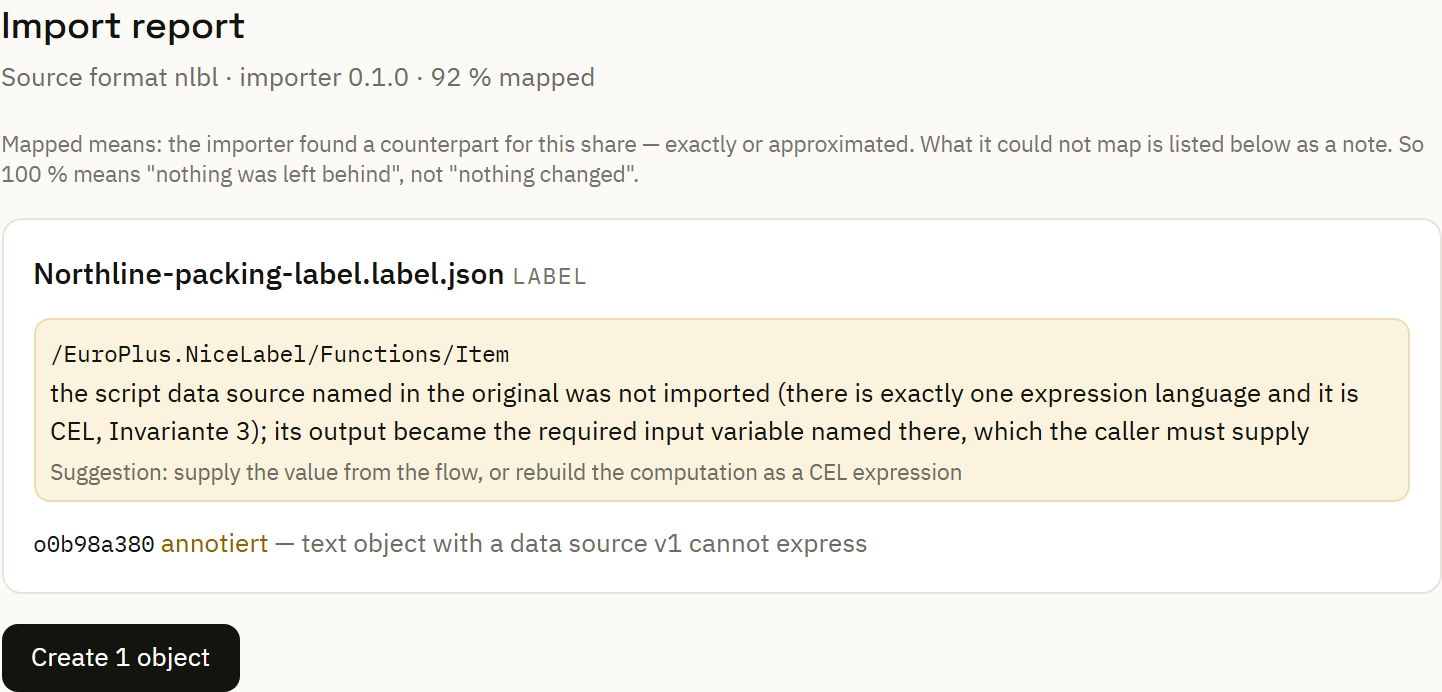
The import report lists converted documents and diagnostics, including the affected construct and available guidance. It gives the label specialist a concrete starting point for adaptation.
In the synthetic example, the importer retains an input binding and flags a legacy script calculation it cannot execute. The next step is explicit: supply the value from the automation or rebuild the calculation in CEL.
The displayed mapping percentage describes this uploaded example. The diagnostics still decide what needs review.
Choose a supported entry point
Import supported constructs from .nlbl designs into editable label documents. Review the resulting objects, variables, artwork, fonts and any conversion findings.
Convert supported .misx process definitions into automation documents. Inspect trigger settings, assignments, conditions, label references and the actions that need adaptation.
The .lvr path reads supported prompt-variable information. Its scope is narrower than a complete label layout or automation migration.
Artwork and retained findings
When the source references linked artwork, the import view can request the missing files. Attach those files and rerun conversion to see the resolved result before adopting it.
Supported label import findings remain attached to the adopted design. Open them in the Designer, inspect the affected objects and mark findings resolved as you complete the review.
Open findings are visible warnings. Resolving one records the review decision; it does not certify physical output.
Continue the design in the browser →Choose the label and automation that capture a real operational need, including their related artwork.
Read the diagnostics, supply missing assets, configure connections and replace unsupported calculations or actions.
Use normal and exceptional inputs. Check mappings and rendered labels, then inspect the actual print request and controlled output sample.
Adopt the converted documents, assign an explicit version and check application at the intended local service.
Check label dimensions, text wrapping, barcode data and the fonts available on the new rendering path. A device-font legacy label needs its own output comparison.
Follow source values through assignments and conditions. Confirm what happens when a field is missing or a connection fails.
Build a generated or custom form around the adopted label's inputs, so the daily task has a clear path after migration.
Create the station workflow →