Database records
Poll a configured database or query it within a flow. Bind selection values to query parameters and decide explicitly when an order's business status should change.
Business data → packing labels
Read a batch, check its values and send each accepted row to the appropriate printer. Give incomplete or invalid records a visible review path before the packing team has to investigate a label.
Northline Parts · synthetic example
Mara, the packing supervisor in this example, needs labels for components and service kits. The export carries order identity, product, lot, units per pack and a packing line.
| Order / row | Product | Lot | Units per pack | Line | Decision |
|---|---|---|---|---|---|
| 1042 / 0012 | Precision bearing 6204 | LOT-260926-A | 24 | A | Prepare a label |
| 1042 / 0013 | Seal service kit | LOT-260926-B | 6 | B | Prepare a label |
| 1043 / 0014 | Precision bearing 6204 | LOT-260926-C | twenty | A | Review the quantity |
The demonstrated source is a local HTTP endpoint serving a CSV export. All records are invented; this example does not connect to a live ERP account.
From source to decision
Jonas, the integration engineer, can change a mapping or validation rule without rebuilding the label for every order.
The flow keeps the source row identity, turns business fields into label variables and uses named printer roles for routing. Site-specific addresses belong in the deployment configuration.
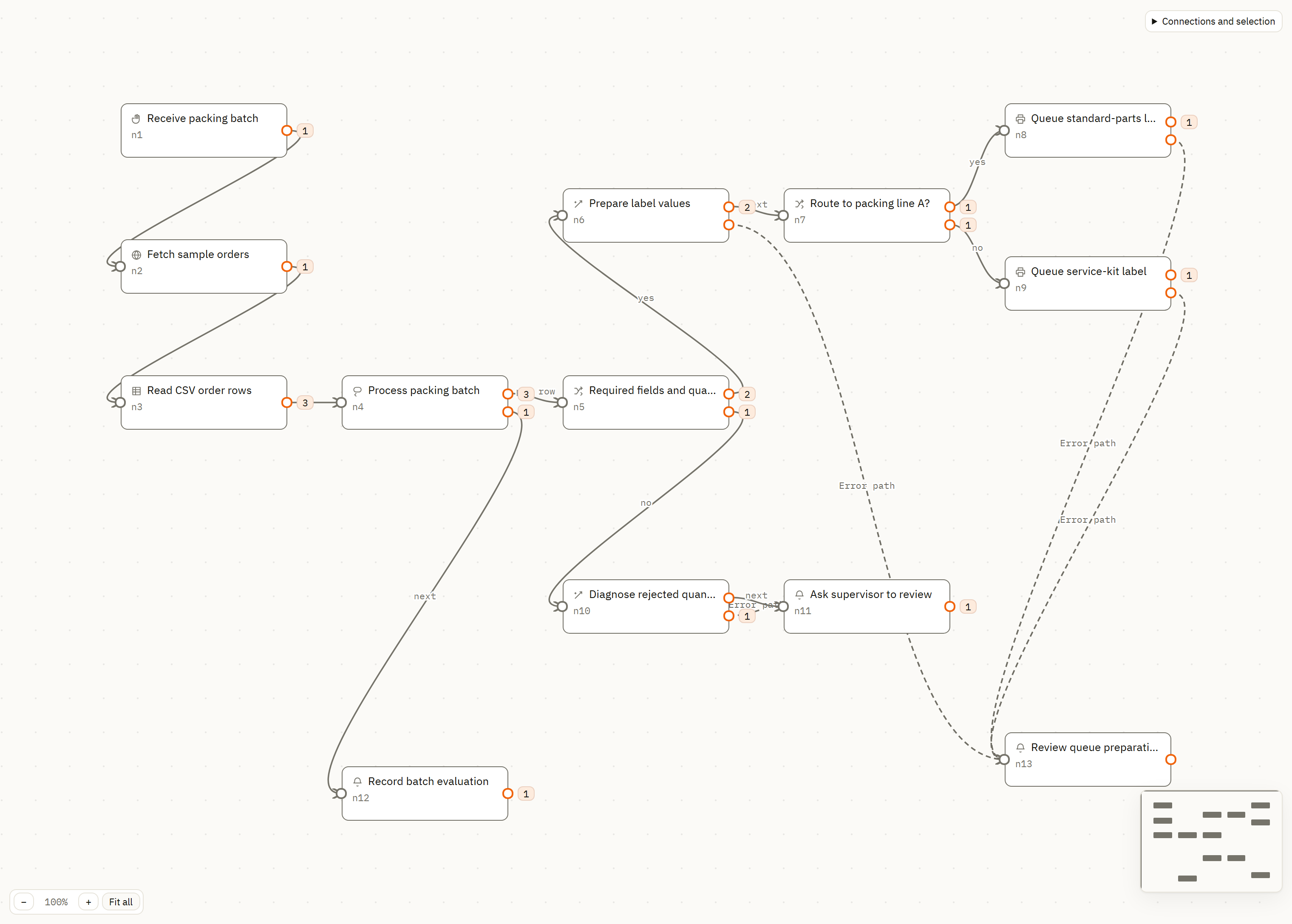
Explore automation capabilities →The service requests the sample file over HTTP and parses its header and three CSV rows. A manual start provides a controlled first run.
A condition checks the lot, part number, line and numeric quantity. Two rows continue; the invalid quantity enters the review branch.
Product, part number, lot and pack quantity map into one reusable packing label. The conversion happens after the accepted rows have been separated.
Line A queues the standard-parts label; line B queues the service-kit label. Both roles use the same local simulator in this demonstration.
The rejected quantity produces a real calculation error and a notice naming order 1043, row 0014 and the value “twenty”. The supervisor has a specific source record to correct.
Review the run, then open the resulting print records. Completing the batch's workflow steps does not establish that a physical label came out.
Observed in the demonstration
The run recorded three parsed rows, two accepted rows and one exception. Each printer branch queued one job. Both resulting archive records report sent to the local ZPL simulator.
The overall run remains marked as failed because a calculation failed on the rejected record. Its branch counts and operator notice explain the partial result. Review existing output before starting the batch again.
Executed on 26 September 2026. A simulator submission establishes the recorded software path; no physical printer output was evaluated.
Follow a request into the archive →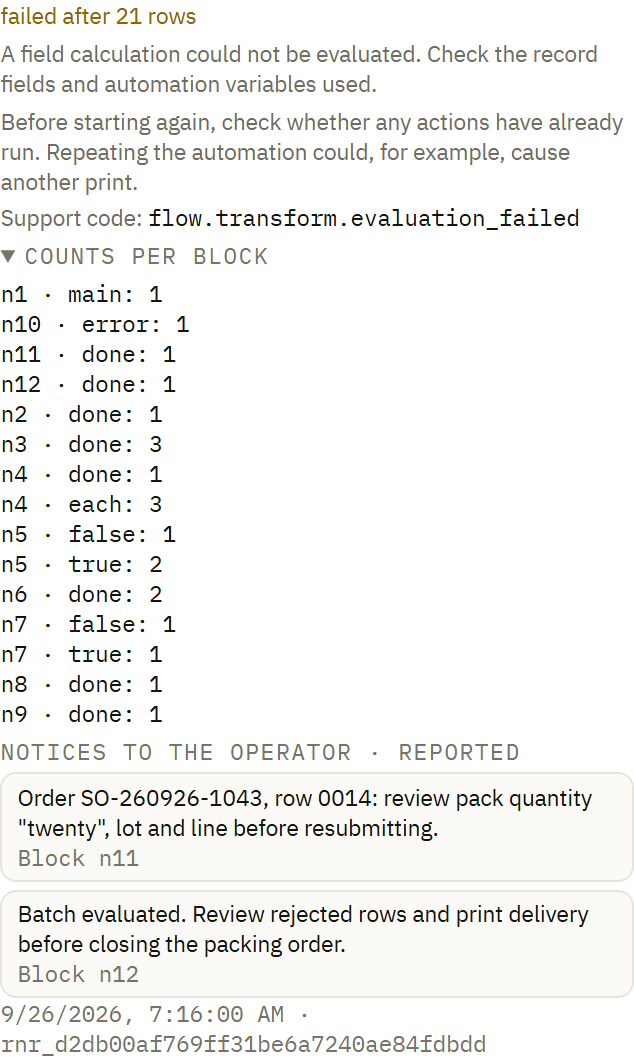
Connect your source
Poll a configured database or query it within a flow. Bind selection values to query parameters and decide explicitly when an order's business status should change.
Watch a local export folder, call a configured HTTP source or accept an authenticated webhook. Choose the trigger location around the network and source you actually have.
Include a missing lot, malformed quantity and unavailable destination in your evaluation. A new manual start creates new work; retain the source identity and review earlier output before repeating it.
In this batch, “24” means 24 bearings inside a pack. The automation requests one label for that row. Decide separately how your operator or integration requests additional copies.